Zerd. An AI that writes code in your terminal, then checks its own work.
An AI that writes code in your terminal, then checks its own work.
curl -fsSL https://www.zerd.si/install.sh | shWorks on macOS, Linux and Windows.
 Claude
 GPT and Codex
 DeepSeek
 MiniMax
 Local models
AI can write code.
But is it right?
So we built zerd.
An AI coding tool that checks its own work before you ever look at it.
It makes the change.
You say what you want in plain words. zerd edits your files.
It runs your tests.
Only the tests and checks for the files it just changed.
npx tsc --noEmit ✓ passedA second AI reviews it.
A different AI reads the actual changes, like a teammate doing a code review.
It argues with itself.
Another pass tries to prove each problem wrong, so you only see the ones that are real.
It checks it isn’t making things up.
Every file and line number it mentions is looked up in your project. No invented files.
You get a short report.
What ran, what passed, and what it couldn’t check. Don’t like the result? One command undoes it.
verified · 1 file changed · 2 checks passed · /undo puts it backRead a short report, not the whole change.
Every run ends with what changed, what was tested, and what zerd couldn’t check. Don’t like it? /undo puts every file back.
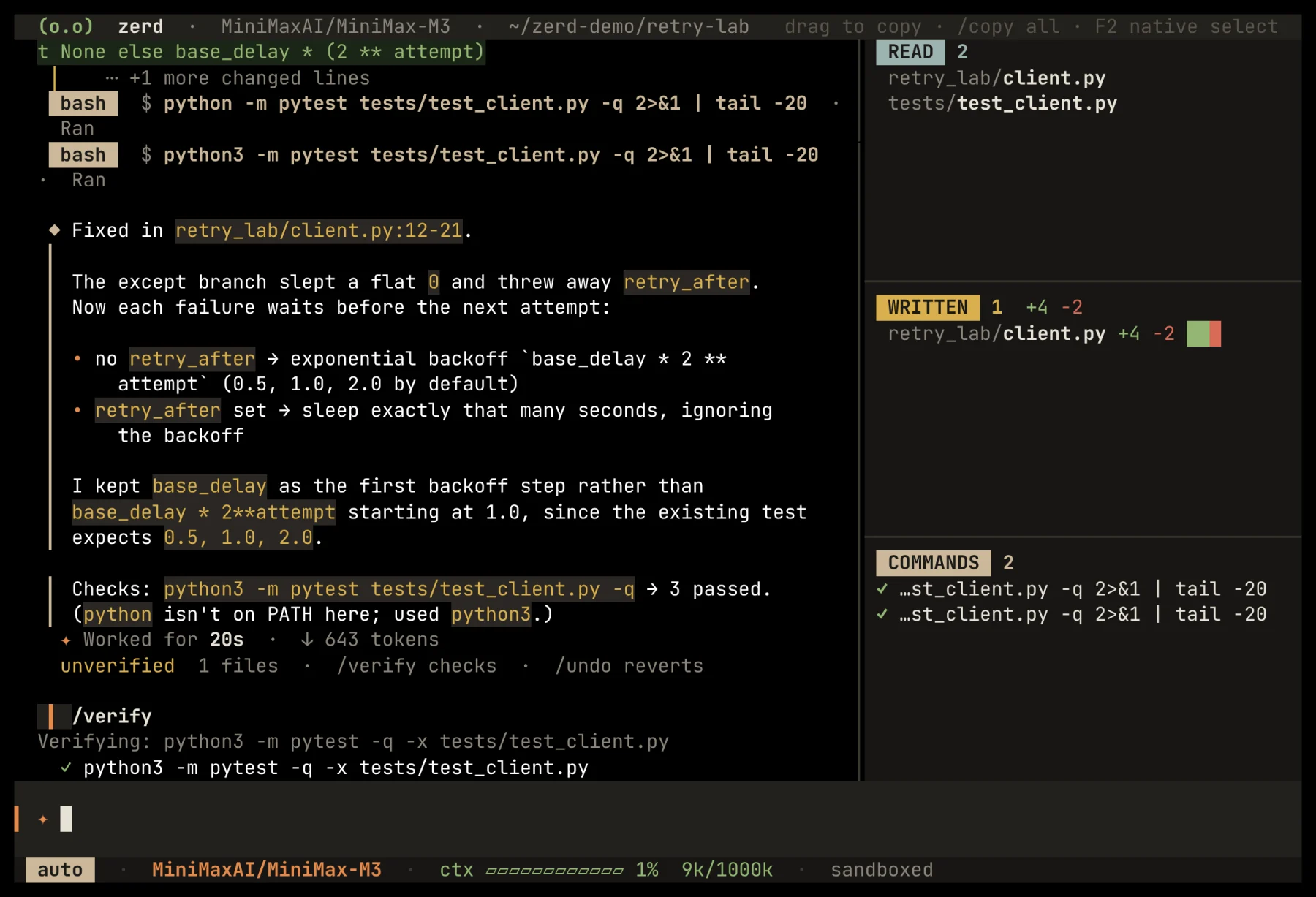
/verify. The panels on the right list what it read, wrote and ran.The receipt
Every run ends with evidence, not a claim
Six steps run on their own after every edit. None of them wait for you. What comes back is a receipt: what ran, what passed, and what nobody could check.
It makes the change
You say what you want in plain words. zerd edits your files.
It runs your tests
Only the tests and checks for the files it just changed.
A second AI reviews it
A different AI reads the actual changes, like a teammate doing a code review.
It argues with itself
Another pass tries to prove each problem wrong, so you only see the ones that are real.
It checks it isn’t making things up
Every file and line number it mentions is looked up in your project. No invented files.
You get a short report
What ran, what passed, and what it couldn’t check. Don’t like the result? One command undoes it.
- checkspytest tests/test_paging.py · ruff on 2 files
- repair1 failure on the first run, fixed and rerun
- reviewsecond model read the real diff, 2 findings
- verify1 finding refuted, 1 held and reproduced
- pathsevery path:line in the answer checked on disk
- unverified2 claims it could not check, listed as such
result1 file changed · 2 checks ok · /undo reverts it
A real recording of zerd fixing a bug in a small project, then checking its own work. Nothing is scripted. Long pauses are shortened.
Try it on one small change
One file to install, about two minutes. If you don’t like what it did, type /undo and everything goes back.
curl -fsSL https://www.zerd.si/install.sh | shWorks on macOS, Linux and Windows.
- Claude
- GPT and Codex
- DeepSeek
- MiniMax
- Local models
Get startedHow it worksv0.1.5
Questions
What is zerd?
zerd is an AI that writes code for you, right in your terminal. After it changes your files, it runs your tests, has a second AI review the changes, and checks that every file and line it mentions really exists. Then it shows you a short report of what it did and what it couldn’t check.
How do I install zerd?
On macOS or Linux, run: curl -fsSL https://www.zerd.si/install.sh | sh. On Windows PowerShell, run: irm https://www.zerd.si/install.ps1 | iex. It is a single file, so there is nothing else to set up.
Which AI models does zerd work with?
Claude, GPT, Codex, DeepSeek and models that run on your own computer. If one provider runs out of quota, zerd switches to the next one and tells you.
How is zerd different from other AI coding tools?
Most tools stop when the AI says it’s done. zerd keeps going: it tests the change, has another AI review it, and tells you honestly what it could not verify. Its safety limits are built into the program itself, so the AI can’t talk its way around them.
Is zerd free and open source?
It is free to use, including for work. You can read the code on GitHub, but it is source-available rather than open source: you can’t copy, modify or redistribute it.
Is zerd an alternative to Claude Code, Aider or Codex CLI?
Yes, it does the same job: an AI coding assistant in your terminal. The difference is that every run ends with a report of which checks ran, what a second AI found in the changes, and which claims were verified. It also works with Claude, GPT, DeepSeek and local models, so you aren’t tied to one provider. In our payments test, zerd used a real PostgreSQL database and Redis where Claude Code used pretend versions. That was one project and one run each, so it shows how deeply each tool checks, not which is better.
Does zerd run on Windows?
Yes, on Windows 10 and 11 in PowerShell, with Git for Windows installed. The extra OS-level sandbox is macOS only for now. On Linux and Windows, zerd still keeps file access inside your project and checks shell commands before running them.
Can I undo what zerd changed?
Yes. Type /undo and every file goes back to how it was before the run.